This chapter links to the course’s interactive demos and uses MathJax for its formulas. Read it through the course website (or download the file and open it in a browser); a Canvas inline preview will reach neither the demos nor the math. All chapters.
Unity for This Course: the Editor, Objects, Scripts, and the Math Types
Unity 1.0 was launched on stage at Apple's WWDC in June 2005, and its editor ran only on Mac OS X. Unity Technologies; Apple WWDC 2005
The mathematics of this text is engine-independent. The practice is not. Each homework (HW1 to HW6) can be done in either of two tracks, Unity or WebGL (the course’s JavaScript demo library over three.js), and HW7 and HW8 in JavaScript or Python. This chapter serves the Unity track, which assumes a working knowledge of the editor, the object model, the scripting lifecycle and the engine’s math types that no lecture has time to teach; the chapter supplies that knowledge in the order the homework needs it. It is not a Unity tutorial in the usual sense. It skips terrain, physics, audio, animation clips and everything else a game needs, and it goes deeper than a tutorial on the four things a graphics course needs: the transform hierarchy and what local and world mean in numbers, the frame loop and its two clocks, the matrix type and its storage, and the difference between the engine’s conventions and the text’s. The course rule, implement and replace, is stated at the end with the list of helpers it forbids and the primitives it allows.
- Installing, and the one version
- The editor: six windows and a button
- Scenes, objects, components
- Scripts: the lifecycle and the two clocks
- C# for people who know Java or C++
- The Transform: local, world, parent
- The math types, against the text’s conventions
- Meshes, materials, textures, prefabs, cameras, lights
- Input, UI, and drawing debug geometry
- Reading a class-example project
- The course rule: implement and replace
- Exercises
1 · Installing, and the one version
Unity is installed through Unity Hub, a launcher that manages editor versions, licenses and projects. The course pins one editor version, Unity 6000.3.11f1 LTS, and every class-example project was saved by it. Opening a project in a different version triggers an upgrade that rewrites project files, produces diffs that are not your work, and occasionally breaks a script; if Hub offers to open a project in a newer version, decline and install the pinned one from Installs. A personal license is free and sufficient. The editor download is several gigabytes; start it before the first homework, not during it.
A project is a folder. Everything the editor knows about it lives under Assets/ (your
scenes, scripts, materials, textures, in whatever subfolders you make) and
ProjectSettings/; the Library/ folder is a cache the editor rebuilds and
should never be shared or committed. The class-example projects arrive as zip files on Canvas; unzip one,
add its folder in Hub under Projects, and open it. The first open of any project compiles its
scripts and imports its assets, which takes a minute and is normal.
2 · The editor: six windows and a button
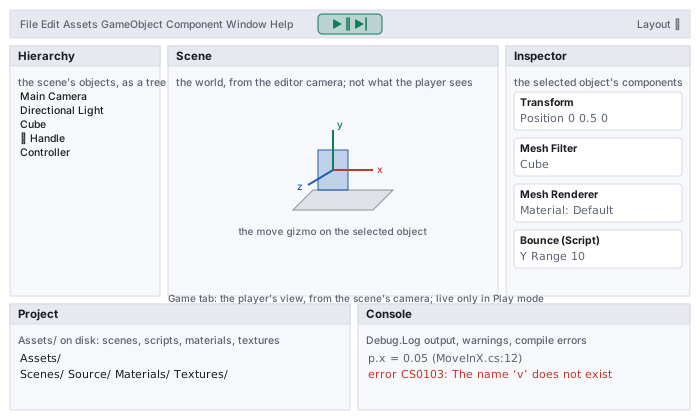
- Hierarchy lists the objects in the open scene as a tree. Indentation is parenting, and parenting is the scene graph of the scene-graph chapter: a child’s transform is expressed in its parent’s frame. Drag one object onto another to parent it.
- Scene is the world seen from the editor camera, which is not an object in the scene and is not what the player sees. Orbit it with Alt and the left mouse button, pan with the middle button, zoom with the wheel, and press F with an object selected to frame it. The three colored handles on a selected object are the move gizmo (x red, y green, z blue); W, E, R switch between move, rotate and scale.
- Game is the scene’s own camera’s view, the player’s picture, drawn only in Play mode.
- Inspector shows the selected object’s components with their editable fields, including the public fields of your scripts. Dragging a scene object onto a field of object or component type is how references are wired without code.
- Project is
Assets/on disk. Double-click a script to open it in the external editor (Visual Studio, Rider or VS Code); double-click a scene to load it. - Console shows
Debug.Logoutput, warnings, and compile errors. A compile error anywhere in the project stops Play from starting; the Console names the file and line.
3 · Scenes, objects, components
MeshFilter names a mesh, a MeshRenderer
draws it with a material, a Camera or Light makes the object a viewpoint
or a light source, and a script is a component you write. Behavior lives in
components; the object is the bag they are attached to.
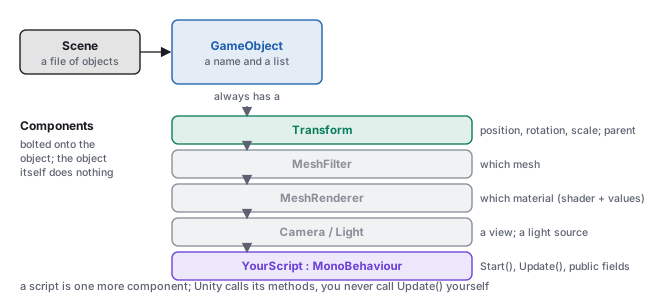
Two consequences shape every class-example script. First, a script needs to know which object it is on
and which others it should touch: transform and gameObject are the
script’s own; GetComponent<T>() finds a sibling component on the same object;
and a public field of type GameObject, Transform or a script type is
filled by dragging in the Inspector. Second, the Inspector is the engine’s view of your model:
a public field is visible and editable there, and its Inspector value overrides the initializer in the
code. The class-example projects use this constantly, and it is the first place to look when a value in the
code seems to have no effect.
4 · Scripts: the lifecycle and the two clocks
A console program runs top to bottom and exits. An interactive program exits only when the player
quits: until then the engine runs the loop of the rasterization chapter
(read input, update the state, draw), and a script hooks the middle of it; on quit it calls
OnApplicationQuit, then OnDestroy. The hooks are methods with fixed
names on a class deriving from MonoBehaviour.
using UnityEngine;

public class Bounce : MonoBehaviour {
    public float yRange = 3f;          // visible in the Inspector; its value there wins
    public float speed  = 2f;
    private float dir   = 1f;          // private: not shown, not overridden

    void Start() {                     // once, before the first frame this object is active
        Debug.Log("Bounce on " + gameObject.name);
    }

    void Update() {                    // once per frame, whatever the frame rate
        Vector3 p = transform.localPosition;         // a copy (Vector3 is a struct)
        p.y += dir * speed * Time.deltaTime;         // rate times seconds: per-second motion
        if (p.y > yRange || p.y < -yRange) dir = -dir;
        transform.localPosition = p;                 // write the copy back, or nothing moves
    }
}
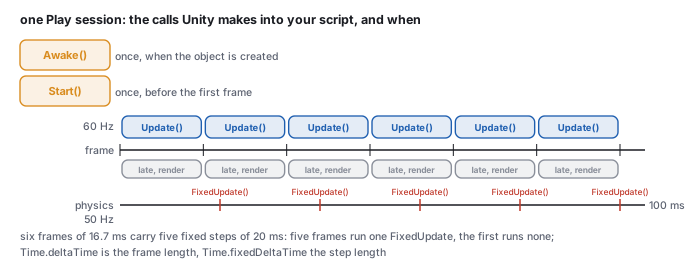
Awake and Start run once; Update runs every frame at whatever rate the machine achieves; FixedUpdate runs on its own fixed clock, 50 times a second by default, and the two do not line up.Awake() runs when the object is created, before any Start; use it for
the object’s own setup. Start() runs once before the object’s first
Update; use it for setup that needs other objects. Update() runs once per
rendered frame; LateUpdate() runs after every object’s Update (a
camera that follows a character reads the character’s final position here);
FixedUpdate() runs on the physics clock, every Time.fixedDeltaTime seconds
(0.02 by default), zero or more times per frame; OnDestroy() runs when the object is
removed. Unity calls them by name, and a misspelled update() is simply never called,
with no error.
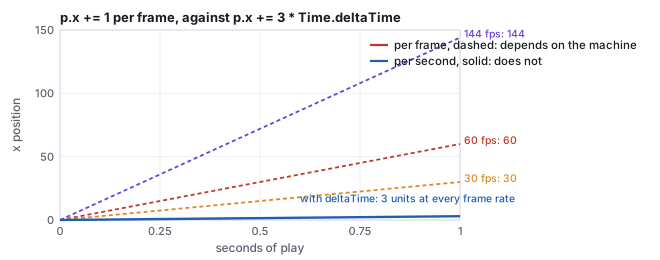
p.x += 1f in Update moves one unit every frame: 60
units per second on a 60 Hz machine, 30 on a 30 Hz one, 144 on a fast monitor. The same script with
p.x += 3f * Time.deltaTime moves 0.05 per frame at 60 Hz, 0.1 at 30 Hz and 0.0208 at
144 Hz, and after one second it has moved 3 units on all three. Time.deltaTime is the
length of the last frame in seconds; a rate multiplied by it is a step in units, and the motion is
the same on every machine. Removing the multiplication for one run makes the
difference visible.
FixedUpdate calls, and the
pattern repeats every 100 ms. Anything physical (forces, rigid bodies) belongs in
FixedUpdate so that its step is constant; everything visual belongs in
Update. This is the accumulator of the interactive-systems
chapter, built into the engine.
5 · C# for people who know Java or C++
Unity scripts are C#, and a programmer who knows Java or C++ can read them at once. The differences that matter for the homework fit in one table; the one that causes bugs is the last row.
| you write | it means | note |
|---|---|---|
public float speed = 2f; | a public field | shown in the Inspector; the f suffix makes a float literal, since 2.0 alone is a double and will not assign |
[SerializeField] private int n; | a private field still shown in the Inspector | the class-example code uses public fields; either works |
var v = new Vector3(1, 2, 3); | local type inference | as in modern Java and C++; the type is still fixed at compile time |
foreach (var c in list) | iterate | Java’s for-each; List<T> is System.Collections.Generic |
void M(ref Matrix4x4 m) | pass by reference | the caller writes M(ref x); the class examples’ scene-graph code passes matrices this way to avoid copies |
GetComponent<Renderer>() | a generic method call | the angle brackets name the component type wanted |
transform.localPosition.x = 1; | a compile error | Vector3 is a struct, a value type: the property returns a copy, and assigning into a copy is refused. Read into a local, change it, write it back. |
Vector3, Quaternion, Matrix4x4 and Color are
structs; GameObject, Transform, Mesh and every component are
classes. Assigning a struct copies it; assigning a class copies a reference. So
Vector3 p = transform.localPosition; p.x += 1; changes nothing on screen until
transform.localPosition = p;, while Transform t = other.transform; t.localPosition = ...
moves the other object immediately. The same rule explains why mesh.vertices[0] = v
does nothing: the vertices property returns a fresh copy of the array each time, and
the class-example code that builds meshes therefore fills a local array and assigns the whole array once
(the meshes chapter shows the pattern).
6 · The Transform: local, world, parent
localPosition, localRotation (a Quaternion) and
localScale are the node’s transform relative to its parent, the \(L\) of
the scene-graph chapter, composed as
\(T\,R\,S\) in that order; localEulerAngles is the same rotation as three angles.
position, rotation and lossyScale are the world values,
read from the composite \(W = W_{\text{parent}}\,L\); setting position solves for the
localPosition that produces it. parent is the link up the tree, and
SetParent(p, true) reparents while keeping the world pose. For an object at the root
the local and world values coincide.
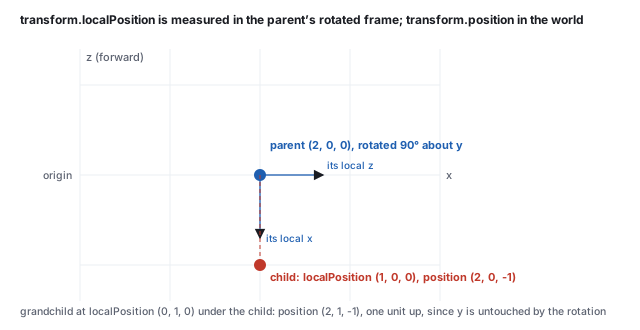
localPosition = (2, 0, 0), localEulerAngles = (0, 90, 0), scale 1.
Child: localPosition = (1, 0, 0). Grandchild under the child:
localPosition = (0, 1, 0). The rotation chapter’s \(R_y(90^\circ)\) sends
\((1, 0, 0)\) to \((0, 0, -1)\), so the child’s world position is
\((2, 0, 0) + (0, 0, -1) = (2, 0, -1)\), and the grandchild’s is \((2, 1, -1)\), one unit up,
since a rotation about \(y\) leaves \(y\) alone. The engine reports exactly these as
child.transform.position and grandchild.transform.position, and
parent.transform.TransformPoint(new Vector3(1, 0, 0)) returns \((2, 0, -1)\) as well:
TransformPoint is \(W\) applied to a point, TransformDirection is its
rotation applied to a vector (no translation), and the Inverse forms go the other way.
The child’s own transform.forward, its local \(+z\) in world coordinates, is
\((1, 0, 0)\).
Two facts about scale. A non-uniform scale on a parent shears a rotated child, which is why the
engine exposes lossyScale rather than a true world scale and why
the scene-graph chapter warns against scaling anything but leaves.
And localScale scales about the object’s own origin, which for an imported mesh is
wherever the modeler put it; the class examples’ pivot sandwich (the
affine chapter) exists because the mesh origin and the desired pivot rarely coincide.
7 · The math types, against the text’s conventions
Unity’s Vector3, Quaternion and Matrix4x4 are the
objects of the vectors, rotation and
affine chapters with a few differences of convention. All the
algebra transfers; three conventions need naming.
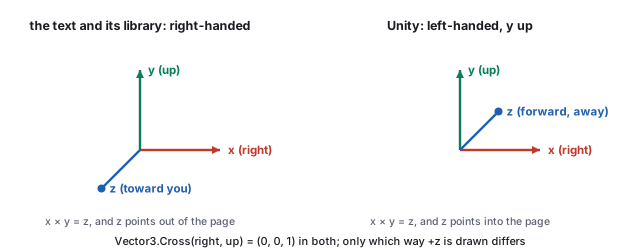
Vector3.Cross(right, up)
returns \((0, 0, 1)\), exactly the component formula of the vectors chapter; Unity names that
vector forward. A positive rotation about an axis is clockwise when looking along the
axis in Unity and counter-clockwise in the text, but the matrices and quaternions are the same
numbers: Quaternion.AngleAxis(90, Vector3.up) applied to forward gives
right, \((1, 0, 0)\), and the rotation chapter’s \(R_y(90^\circ)\) applied to
\((0, 0, 1)\) gives \((1, 0, 0)\) too. A formula written in the text runs unchanged in a script; a
picture drawn from the text must be mirrored in \(z\) to match the Scene view.
| the text | Unity | note |
|---|---|---|
| \(\mathbf{a}\cdot\mathbf{b}\), \(\mathbf{a}\times\mathbf{b}\), \(|\mathbf{a}|\), \(\hat{\mathbf{a}}\) | Vector3.Dot(a, b), Vector3.Cross(a, b), a.magnitude, a.normalized | a.sqrMagnitude avoids the square root; Vector3.Angle is the arccos of the dot in degrees |
| \((x, y, z, w)\) unit quaternion | Quaternion with fields x, y, z, w | same component order as quatFromAxisAngle; Quaternion.AngleAxis(deg, axis) builds one, q * v rotates a vector, q1 * q2 composes (\(q_2\) first), Quaternion.Slerp is the rotation chapter’s slerp |
| Euler angles, engine-dependent order | Quaternion.Euler(x, y, z), localEulerAngles | applied as \(R_y R_x R_z\) (the \(z\) rotation first); the rotation chapter works the same triple in three conventions |
| a \(4\times4\) affine matrix, column-major array | Matrix4x4, m[row, col], flat m[i] | column-major like the library; Matrix4x4.TRS(t, q, s) is \(T R S\); m.MultiplyPoint(p) applies \(M\) to a point with the divide, MultiplyPoint3x4 without, MultiplyVector ignores translation; m.inverse, m.transpose; GetColumn(3) is the translation |
| degrees in \(\sin\), \(\cos\) | Mathf.Sin(Mathf.Deg2Rad * deg) | Mathf works in radians; Mathf.Deg2Rad and Rad2Deg convert |
| \(P\) of the viewing chapter | Matrix4x4.Perspective(fovY, aspect, near, far) | same entries as the library’s perspective; Camera.projectionMatrix holds it, worldToCameraMatrix holds \(V\) |
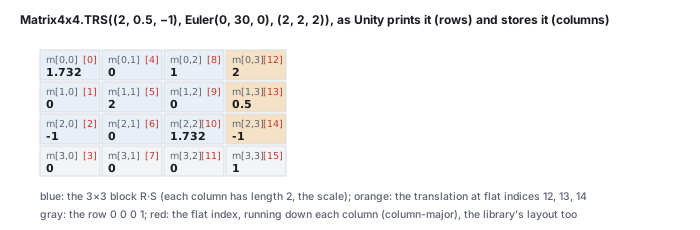
Matrix4x4 two ways: indexed m[row, col] as the engine prints it, and by the flat index m[i] that runs down the columns. The translation sits at flat indices 12, 13, 14.Matrix4x4.TRS(new Vector3(2, 0.5f, -1), Quaternion.Euler(0, 30, 0), Vector3.one * 2) has
rows \((1.732, 0, 1, 2)\), \((0, 2, 0, 0.5)\), \((-1, 0, 1.732, -1)\), \((0, 0, 0, 1)\). The first three
columns are \(R_y(30^\circ)\) scaled by 2: column 0 is \((1.732, 0, -1)\), of length 2, where the
rotated \(x\) axis went; column 3 is the translation. m[0, 3] is 2 and so is
m[12]: the flat index is column times 4 plus row, exactly the layout of the course
library’s 16-element arrays, so a matrix printed by node from
makeTRS(2, 0.5, -1, 0, 30, 0, 2, 2, 2) lists the same sixteen numbers in the same
order. The read-back of the affine chapter recovers the
scale as the column lengths and the rotation as the normalized columns.
8 · Meshes, materials, textures, prefabs, cameras, lights
Mesh. A Mesh object holds the arrays of the
meshes chapter: vertices (Vector3[]), triangles
(int[], three per triangle, clockwise seen from the front in Unity’s left-handed
convention), normals, uv (Vector2[]). A MeshFilter
holds the mesh and a MeshRenderer draws it. Build by filling local arrays and assigning
each whole array once; RecalculateNormals() computes the averaged normals the chapter
derives by hand, and the class-example projects compute them by hand instead, which is the point.
Material and texture. A material is a shader plus the values of its properties; the
same shader with different values is a different material. renderer.material returns
a per-object copy (editing it affects one object), sharedMaterial the asset itself. A
texture is an image asset; drop it into the Assets folder and Unity imports it, and the
material’s main texture slot takes it. The shader chapter covers
what the material feeds to the shader and how a script sets properties from code.
Prefab. A prefab is a saved GameObject (with its components and children) that can
be instantiated any number of times: Instantiate(prefab, position, rotation) returns a
new copy, and Destroy(obj) removes one at the end of the frame. The class examples’
vertex handles are instantiated sphere prefabs, one per vertex.
Camera and light. The scene’s camera is a GameObject with a Camera
component; its Transform is the eye and its fields (fieldOfView, aspect,
nearClipPlane, farClipPlane, orthographic) are the parameters of
the viewing chapter. Camera.main finds the one
tagged MainCamera; ScreenPointToRay(Input.mousePosition) is the unprojection of
the interactive-systems chapter. A Light
component makes its object a directional, point or spot light with a color and an intensity; the
class-example shaders ignore the engine’s lighting and read the light’s transform themselves.
9 · Input, UI, and drawing debug geometry
The class-example projects use the classic input API: Input.GetKey(KeyCode.W) is true while a
key is held, GetKeyDown on the frame it was pressed, Input.GetMouseButton(0)
for the left button, Input.mousePosition for the pointer in window pixels (origin at the
bottom left), and Input.GetAxis("Mouse X") for the pointer’s motion this frame.
Unity 6 also ships the newer Input System package; the class-example code does not use it, and a project
set to one API silently ignores the other.
User interface elements (sliders, buttons, toggles) live on a Canvas object and are
wired to scripts by events: a Slider’s onValueChanged.AddListener(handler)
calls the handler with the new value. The first class-example projects are built this way, and the
pattern is the controller of model-view-controller: the handler
writes the model, and the views read it on the next frame.
Drawing a line or a point for debugging needs no mesh. Debug.DrawLine(a, b, Color.red)
draws a segment in the Scene view for one frame (call it every Update);
Debug.DrawRay(origin, dir) likewise; Gizmos.DrawSphere inside an
OnDrawGizmos() method draws in the editor even when not playing. The vector class examples use
line-renderer prefabs for the same purpose so the lines appear in the Game view too.
10 · Reading a class-example project
Every class-example project follows one layout: a single scene under Assets/Scenes, scripts
under Assets/Source (sometimes split into Model, UI Support,
Prefab Support), and a MainController script on an object named
Controller that wires the UI and owns the world. The reading order that works:
- Open the scene and press Play to see what it does; stop.
- In the Hierarchy, select
Controllerand read its Inspector: the public fields are the model’s parameters and the references to the objects it drives. - Open
MainController.cs.Startis the wiring (theAddListenercalls);Updateis the per-frame work; the handlers are the controller of MVC. - Follow one value from a UI event to the screen: which handler, which model field, which object’s transform or mesh or material changes.
- Predict the effect of one change, make it, Play, compare. That loop is the homework’s method.
The projects are Kelvin Sung’s CSS 451 class examples, written for teaching rather than for shipping: names are explicit, helpers are avoided on purpose, and the comments say what the code is for. Where a project’s convention differs from the lecture’s (a quad split along the other diagonal, a matrix built from rows rather than columns), the homework page says so, and both are correct.
11 · The course rule: implement and replace
| allowed primitives (Unity) | off limits in Unity | off limits in three.js (WebGL track) | what to build instead |
|---|---|---|---|
Vector3.Dot, Vector3.Cross, .magnitude, .normalized, component access | Transform.LookAt, Quaternion.LookRotation | Object3D.lookAt, Matrix4.lookAt; the course library’s lookAtBasis when the homework asks for it | the look-at basis of the viewing chapter from three cross products |
Matrix4x4.TRS, Translate, Rotate, Scale, matrix products, SetRow, SetColumn | Matrix4x4.LookAt, Matrix4x4.Perspective when the homework names them | Matrix4.makePerspective, the projection a PerspectiveCamera builds in updateProjectionMatrix, the library’s perspective, when named | \(V\) and \(P\) entry by entry, as the viewing chapter does |
Quaternion.AngleAxis, quaternion products | Quaternion.Slerp, RotateTowards when named | Quaternion.slerp, Quaternion.slerpQuaternions when named | slerp from the rotation chapter’s formula |
filling Mesh.vertices, triangles, uv | Mesh.RecalculateNormals, primitive geometries when named | BufferGeometry.computeVertexNormals, the built-in geometries when named | face and vertex normals from cross products (the meshes chapter) |
| a 3×3 matrix filled entry by entry | Material.mainTextureOffset, mainTextureScale when the placement matrix is the task | Texture.offset, repeat, rotation with matrixAutoUpdate left on, Texture.matrix.setUvTransform, the library’s uvMat3, when the placement matrix is the task | the placement matrix of the texture-mapping chapter |
Shader.SetGlobalMatrix, Material.SetMatrix | the engine’s automatic transform when named | the modelViewMatrix and projectionMatrix uniforms a ShaderMaterial receives automatically, when named (a RawShaderMaterial is not given their declarations, but three.js still fills them if the shader declares them by those names; use your own names to be sure they are yours) | your own matrix uploaded to your own shader (the shader chapter) |
Each homework page (one per assignment, homework/hwNN/index.html on the course site) names its own list for both tracks and is the authority on which helpers it forbids. This table is also the WebGL track’s (its third column); WebGL and three.js for This Course refers to it rather than repeating it. The habit
the rule builds is the one the text is written for: to know what the helper does, and to be able
to say, with a number, whether it did it.
node from the
css551/ directory.
-
The struct copy. In the
MoveInX.csscript of the first project, replace the body ofUpdatewith the single linetransform.localPosition.x += 1.0f * Time.smoothDeltaTime;and save. Expected: the Console showserror CS1612: Cannot modify the return value of 'Transform.localPosition' because it is not a variable, and Play refuses to start. Restore the three-line form (read, modify, write back). -
The Inspector wins. In
BounceUpAndDown.cs, change the initializerpublic float yRange = 10f;to3f, save, and Play. Expected: the bounce range does not change, because the Inspector still holds 10. Select the object, read the field in the Inspector, set it to 3 there, and Play again. -
Local to world, checked. Build the chain of Section 6 in any scene (three
empty objects, parented, with the local values given) and add to the grandchild a script
whose
Startprintstransform.position. Expected Console line:(2.0, 1.0, -1.0). The same numbers from the course library:node -e "import('./lib/core/xform.js').then(x=>{const P=x.makeTRS(2,0,0,0,90,0,1,1,1),C=x.makeTRS(1,0,0,0,0,0,1,1,1),G=x.makeTRS(0,1,0,0,0,0,1,1,1);const W=x.matMul(x.matMul(P,C),G);console.log([W[12],W[13],W[14]].map(v=>+v.toFixed(3)))})" [ 2, 1, -1 ] -
The matrix layout. Print the TRS matrix of Section 7 from the library and
compare with
Debug.Log(Matrix4x4.TRS(new Vector3(2, 0.5f, -1), Quaternion.Euler(0, 30, 0), Vector3.one * 2)), which Unity prints as four rows:node -e "import('./lib/core/xform.js').then(x=>{const m=x.makeTRS(2,0.5,-1,0,30,0,2,2,2);for(let r=0;r<4;r++)console.log([m[r],m[4+r],m[8+r],m[12+r]].map(v=>+v.toFixed(3)))})" [ 1.732, 0, 1, 2 ] [ 0, 2, 0, 0.5 ] [ -1, 0, 1.732, -1 ] [ 0, 0, 0, 1 ]The engine’s printout has the same four rows to five decimals.
12 · Exercises
Update. On a machine that renders 90 frames per second, how far does it move per frame, and how many frames until it has moved 5 units?
Solution
\(2/90 = 0.0222\) per frame; \(5/0.0222 = 225\) frames, which is 2.5 s, as it should be at any frame rate.FixedUpdate calls happen per second, and what is the largest number of frames in a row with none?
Solution
Fifty, always: the fixed clock does not depend on the frame rate. A frame is 6.94 ms, so at most two consecutive frames (13.9 ms) pass with no fixed step, and every third frame or so runs one.transform.forward?
Solution
\(R_y(180^\circ)(1, 0, 0) = (-1, 0, 0)\), so the child is at \((1, 0, 0)\); its forward is \(R_y(180^\circ)(0, 0, 1) = (0, 0, -1)\).Solution
Column 1, flat indices 4, 5, 6: \((0, 2, 0)\). A rotation about \(y\) leaves the \(y\) axis where it was, and the scale doubles its length.Vector3.Cross(Vector3.forward, Vector3.up) is computed. What is it, and which named direction is that in Unity?
Solution
\((0, 0, 1)\times(0, 1, 0) = (0\cdot0 - 1\cdot1,\; 1\cdot0 - 0\cdot0,\; 0\cdot1 - 0\cdot0) = (-1, 0, 0)\), which isVector3.left. The formula is the vectors chapter’s; the name is Unity’s.
Quaternion.Euler(30, 0, 0) and Quaternion.Euler(0, 0, 30) are applied to Vector3.forward. Which one moves it?
Solution
The first: a rotation about \(x\) tips forward down, to \((0, -0.5, 0.866)\). A rotation about \(z\) leaves \(z\) fixed, so the second returns \((0, 0, 1)\) unchanged.public Transform target; and, in Update, does Vector3 p = target.position; p.y = 0;. Does the target move?
Solution
No.target is a reference (a class), but position returns a struct copy; changing p changes the copy. Add target.position = p; and it moves.
Transform.LookAt. Using allowed primitives, write the three lines that compute a camera’s right, up and backward axes from its position and a target, and say what to check them against.
Solution
Vector3 w = (eye - at).normalized; Vector3 u = Vector3.Cross(Vector3.up, w).normalized; Vector3 v = Vector3.Cross(w, u);, the basis of the viewing chapter. Check: call transform.LookAt(at) on a scratch object and compare its right, up and -forward with \(u\), \(v\), \(w\); they should agree to float precision.
Update prints Time.deltaTime for the first five frames only, and run it. What do the numbers look like, and why is the first one different?
Solution
A counter field, incremented inUpdate, gating a Debug.Log. Typical output: one larger value (the first frame includes scene setup and shader compilation, often 30 to 100 ms), then values near 16.7 ms on a 60 Hz display. Motion code multiplies by this value precisely so that the long first frame produces a proportionally larger step rather than a stall.
Matrix4x4.TRS(new Vector3(1, 2, 3), Quaternion.Euler(0, 0, 90), Vector3.one) and identify the four columns by what they are.