This chapter links to the course’s interactive demos and uses MathJax for its formulas. Read it through the course website (or download the file and open it in a browser); a Canvas inline preview will reach neither the demos nor the math. All chapters.
Texture Mapping: Coordinates, Placement, Sampling
“MIP” in mipmap stands for multum in parvo, Latin for “much in little”; Lance Williams introduced mipmaps in 1983. Williams, Pyramidal Parametrics, SIGGRAPH 1983
A brick wall is geometrically a rectangle. Its bricks, mortar and chips are color, not shape, and modeling them as triangles would spend millions of them on a flat picture. Texture mapping separates the two: the surface keeps its few triangles and takes its appearance from a two-dimensional image through one new per-vertex attribute, a coordinate into that image. Everything else in the chapter is an operation on that coordinate. It is interpolated by the rasterizer like any attribute, transformed by a \(3\times3\) affine matrix to place the image (the homogeneous machinery of the affine chapter, one dimension down), and finally turned into a color by a sampler that must handle both a texel spread over many pixels and many texels crowded into one. The chapter works every step on the \(2\times2\) grid of the meshes chapter and the \(8\times8\) checkerboard of the uv-placement demo, including both of the demo’s placement matrices to the last digit, a bilinear sample by hand, the mip level a pixel selects from its derivatives, the mip pyramid of the checker, a block-compressed texel, the tangent frame of one triangle, and a bump-mapped normal. Two further uses of the machinery close it: a cube map read by direction, and a shadow map, a texture of depths compared rather than displayed.
- Texture coordinates
- Where coordinates come from: projections and unwrapping
- Outside the unit square: wrap modes
- Placement is a \(3\times3\) affine transform
- Sampling under magnification: nearest and bilinear
- Minification, aliasing, and mipmaps
- Texture compression
- Several textures, and textures from formulas
- Bump and normal maps
- Cube maps and environment mapping
- Shadow maps: a texture of depths
- Exercises
1 · Texture coordinates
Which corner is \((0, 0)\), bottom-left or top-left, is an API convention (OpenGL and three.js put \(v = 0\) at the bottom of the image; Direct3D and Unity at the top), and a flipped texture is the usual first symptom of mixing them. The names \(s, t\) mean the same as \(u, v\).
Only the vertices carry authored coordinates. Inside a triangle the rasterizer interpolates \((u, v)\) with the barycentric weights of the rasterization chapter, exactly as it interpolates color and depth, and every covered pixel receives its own \((u, v)\). Because the interpolation is done in the projected image, it must be perspective-corrected (Section 5 there) or the texture swims on tilted surfaces; hardware does this for every attribute. The upshot is that three coordinates per triangle paint the whole triangle, and the picture sticks to the surface as it moves because the coordinate travels with the vertex.
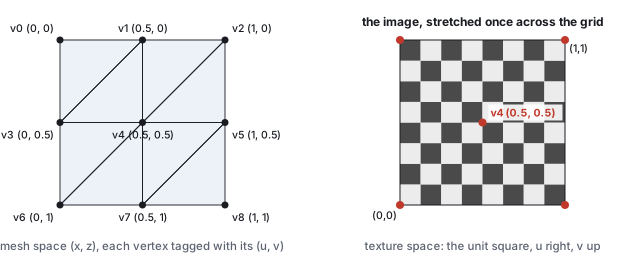
The assignment is a choice. Spreading the image once across the grid is the natural default; mapping the whole image onto one quad, or the range \([0, 2]\) across the grid to repeat it, or an artist-painted unwrap of a character are all the same mechanism with different numbers. Section 4 shows that the common choices need not be authored at all: they are a matrix applied to the default.
2 · Where coordinates come from: projections and unwrapping
The grid’s coordinates were a formula. A general mesh needs a map from its surface to the unit square, and there are three ways to get one: project the surface onto a simple shape, cut it open and flatten it, or paint it by hand in a modeling tool. The projections are formulas on the position.
sphericalUV), which is why the checker in the demo seams and pinches on them.
The seam is unavoidable in any projection that wraps. Two vertices at \((0.999, 0, 0.01)\) and \((0.999, 0, -0.01)\) are a fiftieth of a unit apart in space and get \(u = 0.0016\) and \(u = 0.9984\): a triangle spanning them is told to stretch the whole texture across its width, the streak visible on every spherically mapped model at \(\theta = 0\). The fix is to duplicate the vertices along the seam with \(u\) on each side, the same split of the meshes chapter’s hard edges. The poles pinch for the same reason a map of the Earth stretches Antarctica: a whole ring of texels lands on one vertex.
Unwrapping cuts the mesh along chosen seams into charts that can be flattened with little stretch, and packs the charts into one image, the atlas. The flattening minimizes a distortion measure (angle-preserving, area-preserving, or a mix: Least Squares Conformal Maps, Lévy and others 2002, is the common one); the seams are placed where they will not be seen. An atlas of 16 charts of \(256^2\) in a \(1024^2\) image needs a gutter between charts, because the bilinear filter of Section 5 reads neighbors and the mipmaps of Section 6 average across chart borders: with a 4-texel gutter each chart keeps \(248/256 = 96.9\,\%\) of its area, and the gutter survives two mip levels (\(\log_2 4\)); at level 3 and beyond the charts bleed into each other, one of the reasons atlases limit their mip depth or store each chart’s border color in the gutter.
3 · Outside the unit square: wrap modes
Nothing keeps a coordinate in \([0, 1]\); tiling produces coordinates above 1 on purpose. What the sampler returns outside the square is the texture’s wrap mode, set per axis:
| mode | rule | \(u = 1.3\) | \(u = -0.2\) | use |
|---|---|---|---|---|
| repeat | \(u - \lfloor u \rfloor\), the fractional part | 0.3 | 0.8 | tiles; the demo |
| clamp | \(\min(\max(u, 0), 1)\) | 1.0 | 0 | decals, gradients; the border smears outward |
| mirror | reflect every other period | 0.7 | 0.2 | tiles whose seam would show |
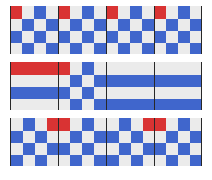
Under repeat, \(u = 1.3\), \(u = 0.3\) and \(u = 2.3\) read the same texel, which is what makes a coordinate range of \([0, 2]\) show the image twice. The negative case follows the same floor: \(-0.2 - \lfloor -0.2 \rfloor = -0.2 + 1 = 0.8\), wrapping in from the far side.
4 · Placement is a \(3\times3\) affine transform
To slide, spin or tile the image on the surface, nobody edits the vertices. The authored coordinates stay, and a transform is applied to \((u, v)\) before the lookup. A translation of the coordinate slides the image; a rotation spins it; a scale by \(k\) makes the coordinates run to \(k\) across the surface, so with repeat wrap the image appears \(k\) times: tile \(= k\). All three together are an affine map of the plane, and the affine chapter’s homogeneous trick makes it one matrix: write \((u, v)\) as \((u, v, 1)\) and multiply by \[ M = \begin{pmatrix} a & b & t_u \\ c & d & t_v \\ 0 & 0 & 1 \end{pmatrix}, \] a \(2\times2\) linear block, a translation column, and the row \((0, 0, 1)\). It is the \(4\times4\) of the 3D chapters one size smaller, with the same composition rules.
A bare rotation or scale acts about the origin, which in texture space is the image’s corner; a
rotated image would swing off the surface. The fix is the pivot
sandwich with the pivot at the image center \(\mathbf{c} = (0.5, 0.5)\). The course library’s
uvMat3 builds, and three.js’s texture matrix pins element for element,
\[
M = T(\mathbf{o})\; T(\mathbf{c})\; S(k, k)\; R(\theta)\; T(-\mathbf{c}),
\]
read right to left on the coordinate: move the center to the origin, rotate, scale, move it back, then
translate by the offset \(\mathbf{o} = (o_u, o_v)\). Multiplied out, the linear block is \(A = S R\) and the
translation column is \(\mathbf{o} + \mathbf{c} - A\mathbf{c}\): whatever the rotation and scale did to the
center is undone, so the center stays put and the image spins and tiles in place.
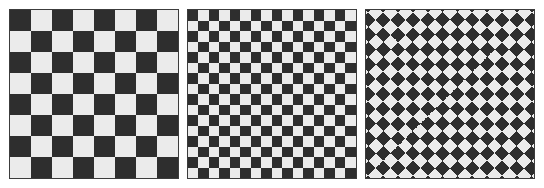
uvMat3, and the resulting \(3\times3\) printed live. Set offset 0.25, rotation
45 and tile 2 to see the second worked matrix.
The matrix multiplies each pixel’s interpolated coordinate in the fragment shader, so placement costs nothing at the geometry level and can animate freely (a scrolling conveyor belt, flowing water). The classroom reference code does the same arithmetic in a loop on the CPU, scaling and offsetting the saved authored coordinates about the corner and writing them back each frame; the matrix is that loop with the rotation and the center pivot added.
5 · Sampling under magnification: nearest and bilinear
After placement each pixel holds a continuous \((u, v)\), and the texture is a discrete grid. The sampler must reconstruct a color from the grid, and the two regimes are opposite problems. Under magnification the texture is drawn larger than its native size, one texel covers many pixels, and the question is what color to give the pixels between texel centers. Under minification (Section 6) one pixel covers many texels.
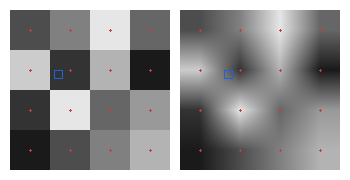
Nearest is right for pixel art and for the demo’s checker, where the crisp squares are the point; bilinear is right for photographs, where blocks are wrong and soft edges are invisible. Both are one setting on the texture and independent of the placement matrix. Bilinear reads four texels for every pixel; hardware does this in dedicated units, and it is the cheapest of the filters in Section 6.
6 · Minification, aliasing, and mipmaps
When a textured surface recedes, one pixel’s footprint on the texture grows until it covers many texels. Reading one of them per pixel, nearest or bilinear, returns whichever texel the pixel center happens to hit, and a hair of motion changes which. The far part of a tiled checker turns into shimmering noise: it is the aliasing of the rasterization chapter and of the image-space chapter, a signal sampled below its frequency. The correct color is the average of every texel under the footprint, and the figure’s right panel computes it the slow way, with sixteen samples per pixel.

Averaging hundreds of texels per pixel, every pixel, every frame, is too slow; the fix is to average once, in advance, at every scale. A mipmap (Lance Williams, 1983; mip from multum in parvo, much in little) stores the texture together with a pyramid of half-size copies, each texel of level \(k+1\) the mean of a \(2\times2\) block of level \(k\). At draw time the sampler estimates the footprint’s size in texels from the screen-space derivatives of \((u, v)\), picks the level whose texels are about a pixel wide, and reads one bilinear sample there; that sample already is the average of the \(2^k\times2^k\) original texels underneath.

Two refinements. Trilinear filtering blends bilinear samples from the two levels bracketing the footprint size, so the seam where the sampler switches level does not show as a visible band across the floor. Anisotropic filtering handles a footprint that is long and thin (a floor seen at a grazing angle covers many texels along the view direction and few across it) by taking several samples along the long axis instead of blurring both axes to the long one; without it a mipmapped floor goes blurry in the distance. The demo uses nearest filtering with no mipmap on purpose, so the aliasing stays visible as a teaching artifact.
Choosing the level: screen-space derivatives
The sampler picks the level from how far \((u, v)\) moves between adjacent pixels. The fragment shader runs on \(2\times2\) blocks precisely so that these derivatives are available: with \(\partial(u,v)/\partial x\) and \(\partial(u,v)/\partial y\) in texels, \[ \lambda = \log_2 \max\bigl(|\partial(u,v)/\partial x|,\; |\partial(u,v)/\partial y|\bigr), \] and the level is \(\lambda\) rounded, or the two levels around it blended (trilinear). A negative \(\lambda\) means magnification and level 0.
| row | depth | \(\partial(u,v)/\partial x\) (texels) | \(\partial(u,v)/\partial y\) | footprint | \(\lambda\) | level |
|---|---|---|---|---|---|---|
| 100 (near) | 1.19 | \((0.11, 0)\) | \((0, -0.14)\) | \(0.11\times0.14\) | \(-2.85\) | 0, magnified |
| 60 | 1.96 | \((0.19, 0)\) | \((0, -0.37)\) | \(0.19\times0.37\) | \(-1.43\) | 0 |
| 30 | 3.77 | \((0.36, 0)\) | \((0, -1.35)\) | \(0.36\times1.35\) | \(0.43\) | 0 |
| 10 (far) | 9.82 | \((0.94, 0)\) | \((0, -8.77)\) | \(0.94\times8.77\) | \(3.13\) | 3 |
Anisotropic filtering resolves it by taking several samples from the level chosen for the short axis, spaced along the long axis: at the far row, the ratio is \(8.77/0.94 = 9.3\), so ten taps at level 0 along the direction of the plane, averaged. Hardware caps the count (16 is the usual maximum) and falls back to a blurrier level beyond it. On the demo’s receding checker this is the difference between a sharp floor to the horizon and one that goes gray after a few units.
7 · Texture compression
A \(4096^2\) texture in 8-bit RGB is 50 MB, its mipmap 67, and a scene has hundreds. Textures are stored compressed in a form the GPU decodes per fetch, which rules out image codecs (JPEG needs the whole block chain) and leads to fixed-rate block compression: every \(4\times4\) block of texels becomes the same number of bits, so a texel’s address is computable.

The family grew as the need did: BC3 adds a separately compressed alpha channel (8 bits per texel), BC5 stores two channels for normal maps (Section 9), BC6H stores HDR, and BC7 spends 8 bits per texel on several partition shapes and reaches near-lossless quality. Mobile GPUs use ETC2 and ASTC, the latter with block sizes from \(4\times4\) to \(12\times12\) for rates from 8 down to 0.9 bits per texel. All are decoded by the sampling hardware between the memory fetch and the filter of Sections 5 and 6, so a compressed texture is mipmapped, filtered and wrapped exactly like an uncompressed one, at a sixth of the bandwidth.
8 · Several textures, and textures from formulas
Nothing limits a surface to one lookup. A fragment shader can sample two textures with two coordinate sets and combine them with any arithmetic: a weighted blend \(0.2\,T_1 + 0.8\,T_2\), a product (a detail map that darkens and lightens a base color), a blend by a third texture used as a mask. Modern materials are exactly this: a base color map, a roughness map, a normal map (Section 9), an occlusion map, each a lookup at the pixel’s \((u, v)\), each feeding one input of the lighting.
And nothing requires the lookup to read stored texels. The sampler’s contract is a color for a coordinate, and a function supplies that too. The demo’s checkerboard is one: \[ \text{checker}(u, v) = \begin{cases} \text{light} & \text{if } \lfloor 8u \rfloor + \lfloor 8v \rfloor \text{ is even} \\ \text{dark} & \text{otherwise,} \end{cases} \] which the demo evaluates once into an \(8\times8\) texture and a shader could evaluate per pixel with no texture at all. A procedural texture has no resolution (zoom in forever, never a block), no memory beyond the formula, and parameters that regenerate it instantly. Regular patterns (checks, stripes, bricks, grids) are short formulas; natural ones (marble, wood, clouds, terrain) are formulas with a smooth pseudo-random function inside, Perlin’s noise (1985), warped and layered at several frequencies. An arbitrary picture, a face or a logo, is easier to paint than to derive, so production materials use both kinds. Stored textures, computed textures and the image models of the diffusion chapter are three answers to the same question: where does the color at \((u, v)\) come from?
9 · Bump and normal maps
A texture can also supply an input to the lighting instead of a color. Blinn’s bump map (1978) is a grayscale height field \(h(u, v)\) over the surface; instead of displacing the geometry (which would need vertices where the bumps are), the shading normal is tilted by the height field’s slope, so the surface is lit as if it had the relief. The geometry stays flat; the silhouette stays straight; the shading says otherwise.
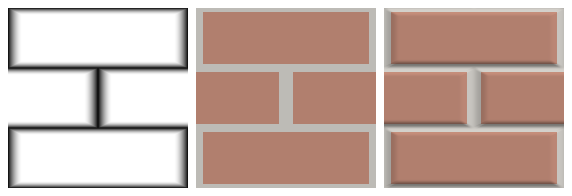
A normal map skips the derivative and stores the tangent-space normal itself, one \((x, y, z)\) per texel encoded as a color (the characteristic lavender of a flat normal map is \((0, 0, 1)\) mapped to \((0.5, 0.5, 1)\)). It is what games ship: the normals of a million-triangle sculpt baked onto a few thousand triangles (Cohen, Olano and Manocha, 1998), so the low level of detail of the meshes chapter keeps the high level’s shading. The limits are the same for both: the silhouette is the low-polygon one, the bumps cast no shadows onto each other, and at grazing angles the flat truth shows. Displacement mapping, which moves the vertices, is the honest version and costs the geometry the trick was avoiding.
Tangent space from the coordinates
The frame in which a normal map’s vectors are expressed must be built from the mesh. Its third axis is the vertex normal; its first two are the directions in which \(u\) and \(v\) increase across the surface, which the texture coordinates of the triangle’s corners determine.
Parallax mapping
A normal map changes the shading but not where the texture is read, so bumps do not shift as the eye moves. Parallax mapping (Kaneko and others, 2001) offsets the coordinate by the height along the view direction before every lookup: with the view vector \(\mathbf{V}\) in tangent space and height \(h\) at the point, \((u, v) \leftarrow (u, v) + s\,h\,(V_x, V_y)/V_z\). At the demo’s view, \(\mathbf{V} = (0.518, 0.207, 0.830)\), \(h = 0.3\) and \(s = 0.05\), the offset is \((0.0094, 0.0037)\), about a texel on a \(128^2\) map, enough for a brick to appear to stand proud. At a grazing view \(\mathbf{V} = (0.97, 0.11, 0.22)\) it is \((0.0675, 0.0075)\), seven times larger, and the texture swims. Parallax occlusion mapping replaces the single offset by a ray march through the height field and produces correct self-occlusion at a few dozen texture reads per pixel; displacement mapping, which moves the vertices, remains the honest version.
- Build a placement matrix with all three knobs and read it back in row-major form. The library returns column-major; the last three numbers before the final 1 are the translation column.
node -e "import('./lib/core/xform.js').then(x=>console.log(x.uvMat3(0.1,0,90,3,3).map(v=>+v.toFixed(3)).join(', ')))"
0, -3, 0, 3, 0, 0, -0.9, 2, 1
Row-major that is \(\begin{pmatrix} 0 & 3 & -0.9 \\ -3 & 0 & 2 \\ 0 & 0 & 1 \end{pmatrix}\): the block is \(3R(90^\circ)\), and the translation is the center correction \(\mathbf{c} - A\mathbf{c} = (-1, 2)\) plus the offset \(0.1\) in \(u\). Check it on the demo with offset 0.1, rotation 90, tile 3. - Compute a mip level by hand from two coordinates one pixel apart: if a pixel reads \((u, v) = (0.500, 0.250)\) and its right neighbor \((0.508, 0.250)\) on a \(1024^2\) texture, the derivative is \(0.008 \times 1024 = 8.2\) texels and \(\lambda = \log_2 8.2 = 3.0\): level 3, the \(128^2\) copy.
- In the placement demo, set tile 6 and tilt the quad away with the orbit camera until the far edge shimmers; then tile 1: the shimmer is gone because no pixel covers more than one texel. That is the minification threshold of Section 6’s table, crossed by hand.
- In the bump demo, drag the light azimuth through \(180^\circ\) at bump 1.2: every groove’s bright and dark walls swap sides, which they would not do for real geometry seen from a fixed camera; the relief is shading only.
10 · Cube maps and environment mapping
A texture can be indexed by a direction instead of a surface coordinate. The standard container is the cube map: six square images, the views from a point along \(\pm x, \pm y, \pm z\), looked up by a 3D vector.
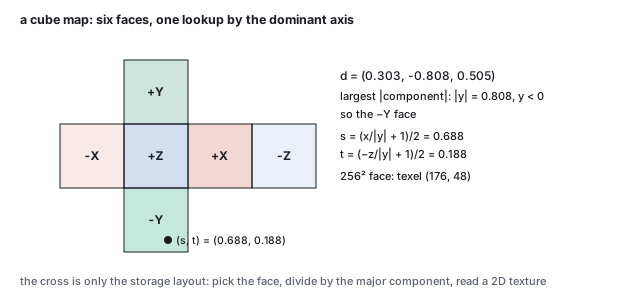
Two directions are looked up in practice. The reflection vector \(\mathbf{R} = \mathbf{d} - 2(\mathbf{d}\cdot\mathbf{N})\mathbf{N}\) of the view direction gives environment mapping (Blinn and Newell, 1976): a mirror ball shows the room, a car paint shows the sky, at one fetch per pixel and with the assumption that the environment is infinitely far away (so nothing in the scene reflects in anything else). The normal itself, looked up in a cube map that stores the environment pre-blurred by the cosine lobe, gives the irradiance for diffuse lighting, which the illumination chapter continues; pre-blurred by a glossy lobe at each mip level, it gives the specular term of image-based lighting. Skyboxes are the same texture drawn on the inside of a cube around the camera. Cube maps also hold omnidirectional shadow maps for point lights, the next section’s idea in six directions.
11 · Shadow maps: a texture of depths
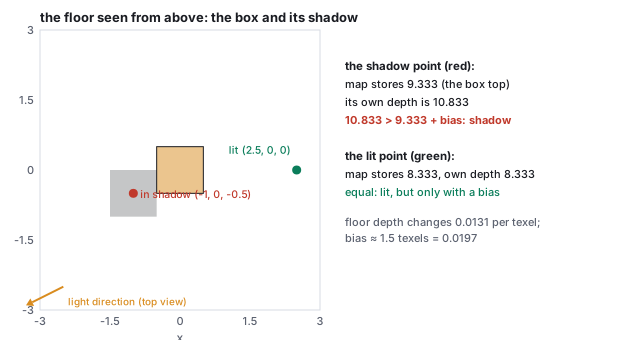
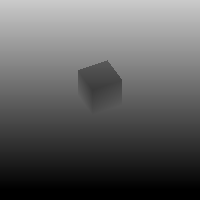
The last use of a texture in this chapter stores no color at all. A shadow map (Williams, 1978) is the scene’s depth rendered from the light’s point of view; when the scene is then rendered from the camera, each pixel’s world position is projected into the light’s view, its depth from the light is compared with the depth the map stores at that texel, and it is in shadow if it is farther. It is the depth buffer of the rasterization chapter used twice, once to decide visibility from the light and once, as a texture, to decide it again from the camera.
12 · Exercises
Solution
\(0.5\,(0.5, 0) + 0.25\,(0, 0.5) + 0.25\,(0.5, 0.5) = (0.375, 0.25)\). Texel \((\lfloor 3 \rfloor, \lfloor 2 \rfloor) = (3, 2)\); \(3 + 2\) is odd, so dark.Solution
\(2.75\): repeat 0.75, clamp 1, mirror: \(2.75\) is in the period \([2, 3)\), an even one, so 0.75. \(-1.4\): repeat \(-1.4 + 2 = 0.6\); clamp 0; mirror: \([-2, -1)\) is even, so \(-1.4 + 2 = 0.6\); had it been \(-0.4\), in the odd period \([-1, 0)\), the answer would be \(0.4\).Solution
\(A = 3I\); translation \(\mathbf{o} + \mathbf{c} - 3\mathbf{c} = (0.1 - 1, -1) = (-0.9, -1)\). \(\mathbf{v}_4 \mapsto (1.5 - 0.9, 1.5 - 1) = (0.6, 0.5)\): the center moved by the offset. \(\mathbf{v}_8 \mapsto (3 - 0.9, 3 - 1) = (2.1, 2)\), read under repeat at \((0.1, 0)\).Solution
Texel position \((1.5, 1.5)\): \(i = j = 1\), \(f_x = f_y = 0.5\). The four texels \(T_{1,1} = 0.9\), \(T_{2,1} = 0.4\), \(T_{1,2} = 0.2\), \(T_{2,2} = 0.7\) with equal weights: \((0.9 + 0.4 + 0.2 + 0.7)/4 = 0.55\). The image center is equidistant from four texel centers, so bilinear is their plain mean.Solution
Eleven levels, \(1024\) down to \(1\). Total \(\sum_{k=0}^{10} 4^k = (4^{11} - 1)/3 = 1{,}398{,}101\) texels, \(1.333\) times the base. A footprint of 16 texels needs level \(\log_2 16 = 4\), the \(64\times64\) copy, where one texel is the average of a \(16\times16\) block.Solution
\(\mathbf{n}' = \mathrm{normalize}(0.44, 0, 1) = (0.403, 0, 0.915)\); \(\mathbf{n}'\cdot\mathbf{L} = 0.403\cdot0.426 + 0.915\cdot0.669 = 0.784\), brighter than the flat 0.669. The two walls of one brick differ by \(0.784 - 0.440 = 0.344\) in brightness, the contrast that the eye reads as relief.Solution
The first is the north pole: \(\phi = 90^\circ\), \(v = 1\), and \(\theta = \mathrm{atan2}(0, 0)\) is undefined; every \(u\) is equally right, and the pole pinches. The second has \(\theta = 180^\circ\), \(u = 0.5\), \(v = 0.5\): fine, but its neighbors at \(z = \pm\epsilon\) have \(u = 0.5 \pm \epsilon'\) with no seam, because the seam is at \(\theta = 0\), the \(+x\) axis. The library’s runtime coordinates put the seam at \(+x\) and its baked assets at \(-x\), a convention drift the code comments record.Solution
\(\lambda = \log_2 2.5 = 1.32\): levels 1 and 2 blended with weights 0.68 and 0.32. The anisotropy is \(2.5/0.3 = 8.3\): nine taps at level \(\log_2 0.3 < 0\), so level 0, spread along \(x\).Solution
Uncompressed: \(2048^2 \times 3 \times \tfrac43 = 16.8\) MB; BC1: \(2048^2 \times 0.5 \times \tfrac43 = 2.8\) MB. In 2 GB: 119 against 714. The factor is the fixed 6.Solution
Depth from the light is the point’s distance along \(\mathbf{d}\) from the light plane: \(\mathbf{d}\cdot(\mathbf{p} - \mathbf{l})\) with \(\mathbf{l} = (6.67, 6.67, 3.33)\); for \((2.5, 0, 0)\) that is \((-0.667)(-4.17) + (-0.667)(-6.67) + (-0.333)(-3.33) = 8.33\), the stored value. A bias \(\beta\) in depth shifts the shadow’s edge along the floor by \(\beta / \sin 48.2^\circ\) toward the box; keeping that under 0.05 needs \(\beta < 0.037\), and the acne-free minimum of 0.02 satisfies it with room to spare. RunlookAtBasis([6.67, 6.67, 3.33], [0, 0, 0], [0, 1, 0]) from the library and apply its V to the point to confirm the depth.