This chapter links to the course’s interactive demos and uses MathJax for its formulas. Read it through the course website (or download the file and open it in a browser); a Canvas inline preview will reach neither the demos nor the math. All chapters.

Rasterization and the GPU Pipeline

Juan Pineda's 1988 paper made edge functions the basis of parallel rasterization, which is how GPUs still decide which pixels a triangle covers. Pineda, A Parallel Algorithm for Polygon Rasterization, SIGGRAPH 1988

After projection a triangle is three points on the image plane, and a screen is a grid of pixels. Rasterization bridges the two: for every pixel, test its center against the triangle’s three edges, and if it is inside, blend the corner attributes to shade it. Three edge functions do the test and, normalized, are the blending weights. This chapter works one pixel by hand, then works the machinery around that pixel: how the three functions are stepped across a bounding box in fixed-point arithmetic, why a pixel whose center lies exactly on an edge shared by two triangles must be given to exactly one of them, what the clipper does to a triangle that pokes through the near plane, why edges stair-step, how the depth buffer decides which of two overlapping triangles wins and how rejecting a fragment before shading it saves the shading, why attributes must be interpolated in \(1/w\), how two transparent fragments combine and why a texture must carry premultiplied alpha, and how a line was drawn before there were triangles. It closes with the fixed and programmable stages of a GPU, the deferred and tile-based variants of the pipeline, and the frame loop.

Contents
  1. Edge functions: is the pixel inside?
  2. Triangle setup: the bounding box, increments, fixed point
  3. Shared edges: the top-left rule
  4. Barycentric coordinates: what color is it?
  5. Clipping at the near plane
  6. Aliasing and supersampling
  7. The depth buffer
  8. Early z and overdraw
  9. Perspective-correct interpolation
  10. Blending: the over operator and premultiplied alpha
  11. Lines: Bresenham
  12. The GPU pipeline
  13. Deferred and tile-based pipelines
  14. The frame loop, the framebuffer, and the budget
  15. Hands-on
  16. Exercises

1 · Edge functions: is the pixel inside?

Definition (edge function) For an edge from \(\mathbf{a}\) to \(\mathbf{b}\) and a point \(\mathbf{p}\), all in the image plane, \[ E_{ab}(\mathbf{p}) = (b_x - a_x)(p_y - a_y) - (b_y - a_y)(p_x - a_x), \] the \(z\) component of \((\mathbf{b} - \mathbf{a})\times(\mathbf{p} - \mathbf{a})\): twice the signed area of the triangle \(\mathbf{a}, \mathbf{b}, \mathbf{p}\), positive when \(\mathbf{p}\) is to the left of the directed edge. For a counter-clockwise triangle \(\mathbf{v}_0\mathbf{v}_1\mathbf{v}_2\), a point is inside exactly when all three of \(E_{12}, E_{20}, E_{01}\) are non-negative.

This is the which-side test of the vectors chapter, in two dimensions, three times. It is also linear in \(\mathbf{p}\), so stepping one pixel to the right adds a constant to each edge function: a rasterizer evaluates three additions per pixel, which is why the operation could be frozen into silicon (Pineda, 1988).
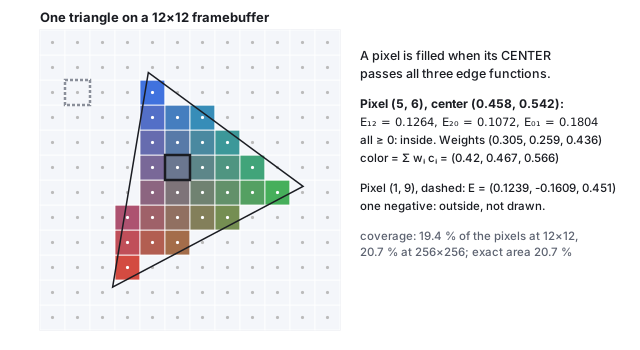
A triangle with red, green and blue corners over a 12 by 12 pixel grid; pixels whose centers fall inside are filled with the blended corner colors and the rest are empty; pixel (5,6) is outlined in black and pixel (1,9) in dashed gray, with their edge-function values listed.
The raster demo’s triangle on a \(12\times12\) framebuffer. Small dots are the pixel centers, the only points ever tested. The outlined pixel is worked below; the dashed one fails one edge and is not drawn.
Worked example (one pixel) The triangle’s corners (in \([0,1]^2\), \(y\) up) are \(\mathbf{v}_0 = (0.242, 0.143)\), \(\mathbf{v}_1 = (0.877, 0.479)\), \(\mathbf{v}_2 = (0.361, 0.858)\), counter-clockwise, with \(E_{01}(\mathbf{v}_2) = 0.414\), twice its area. Pixel \((5, 6)\) of a \(12\times12\) grid has center \(((5 + \tfrac12)/12, (6 + \tfrac12)/12) = (0.458, 0.542)\).
\(E_{12}\)\((0.361 - 0.877)(0.542 - 0.479) - (0.858 - 0.479)(0.458 - 0.877) = -0.0325 + 0.1589 = 0.1264\)
\(E_{20}\)\((0.242 - 0.361)(0.542 - 0.858) - (0.143 - 0.858)(0.458 - 0.361) = 0.0376 + 0.0696 = 0.1072\)
\(E_{01}\)\((0.877 - 0.242)(0.542 - 0.143) - (0.479 - 0.143)(0.458 - 0.242) = 0.2534 - 0.0730 = 0.1804\)
All three positive: the pixel is inside and is drawn. Pixel \((1, 9)\) has \(E = (0.124, -0.161, 0.451)\); one negative, outside, skipped. Every one of the 144 pixels is decided the same way, and 28 of them (19.4 %) pass.

2 · Triangle setup: the bounding box, increments, fixed point

A rasterizer does not test all 144 pixels. Triangle setup computes, once per triangle, everything the per-pixel loop needs: the bounding box of the three vertices, clamped to the screen, so that only its pixels are visited; the three edge functions at the box’s first pixel center; and the amount each edge function changes per step in \(x\) and in \(y\), which are just the coefficients of the linear form.

Incremental evaluation Since \(E_{ab}(\mathbf{p})\) is linear, \(E_{ab}(p_x + 1, p_y) = E_{ab}(\mathbf{p}) - (b_y - a_y)\) and \(E_{ab}(p_x, p_y + 1) = E_{ab}(\mathbf{p}) + (b_x - a_x)\). Evaluate the three functions once at the corner of the bounding box, then walk the box adding constants: three additions and three sign tests per pixel, no multiplication.
Worked example (setup for the demo’s triangle at \(12\times12\)) In pixel units the corners are \((2.904, 1.716)\), \((10.524, 5.748)\), \((4.332, 10.296)\); the bounding box is columns 2 to 10 and rows 1 to 10, 90 pixels instead of 144. The per-step increments are
edge\(\partial E/\partial x\)\(\partial E/\partial y\)
\(E_{12}\)\(-4.548\)\(-6.192\)
\(E_{20}\)\(8.580\)\(-1.428\)
\(E_{01}\)\(-4.032\)\(7.620\)
At pixel \((4, 6)\) the functions are \((22.741, 6.862, 30.019)\) (in pixel-squared units, the Section 1 values times \(144\)); one step right, at \((5, 6)\), they are \((22.741 - 4.548,\; 6.862 + 8.580,\; 30.019 - 4.032) = (18.193, 15.442, 25.987)\), which is \(144\) times Section 1’s \((0.1264, 0.1072, 0.1804)\). The increments sum to zero across the three edges in each direction, as they must, because the three functions sum to the constant twice-area.

Hardware does this in fixed point: vertex positions are snapped to a grid of \(1/256\) pixel (8 sub-pixel bits; 4 was the old standard), so that every edge function is an integer and the additions can never accumulate rounding error across a row. The demo’s vertices snap to \((743, 439)\), \((2694, 1471)\) and \((1109, 2636)\) in units of \(1/256\) pixel, and its twice-area changes from \(59.622\) to \(59.641\) pixels squared: a snap of at most half a sub-pixel moves each vertex by at most \(0.002\) pixel, invisible, and buys exact arithmetic. For a \(2048\times2048\) screen an edge function needs \(38\) bits, which is why rasterizers keep a guard band (Section 5) rather than accept arbitrary coordinates.

3 · Shared edges: the top-left rule

Two triangles that share an edge share the pixel centers that lie exactly on it, and “exactly on” happens constantly in fixed point: a diagonal through a grid of pixel centers hits one per row. If both triangles draw such a pixel, an opaque mesh draws it twice (harmless, but wasteful) and a transparent one blends it twice (visible: a bright seam). If neither draws it, there is a hole. The rasterizer needs a tie rule that assigns every point of the plane to exactly one triangle.
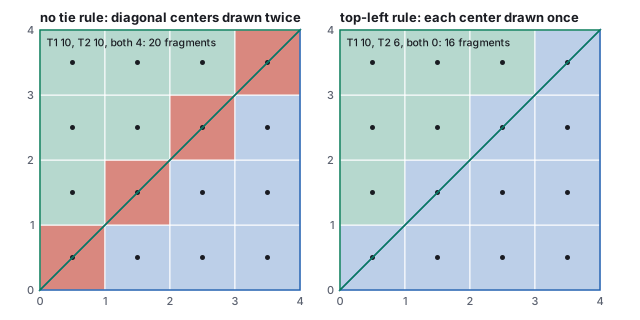
Definition (the top-left rule) A pixel center with \(E = 0\) on an edge is drawn only if that edge is a top edge or a left edge of its triangle. For counter-clockwise triangles with \(y\) up, where the interior is to the left of each directed edge, a left edge is one that runs downward (\(b_y < a_y\)) and a top edge is horizontal and runs leftward (\(b_y = a_y\), \(b_x < a_x\)). The rule is equivalent to nudging every sample point by an infinitesimal amount up and to the left, so no sample is ever exactly on an edge.
Two 4 by 4 pixel grids each split by the diagonal from (0,0) to (4,4) into a blue lower-right triangle and a green upper-left one; on the left, the four diagonal pixels are red, drawn by both; on the right, with the top-left rule, each diagonal pixel is blue, drawn by the lower triangle only.
Two triangles sharing the diagonal of a \(4\times4\) grid. Without a tie rule the four centers on the diagonal are drawn twice; with the top-left rule the diagonal is a left edge of the lower triangle and not of the upper one, so each is drawn once.
Worked example (the diagonal) \(T_1 = (0,0), (4,0), (4,4)\) and \(T_2 = (0,0), (4,4), (0,4)\), both counter-clockwise, sharing the edge from \((0,0)\) to \((4,4)\); the pixel centers \((0.5, 0.5)\), \((1.5, 1.5)\), \((2.5, 2.5)\), \((3.5, 3.5)\) lie on it with \(E = 0\) for both. Without a rule, \(T_1\) covers 10 centers and \(T_2\) covers 10: 20 fragments for 16 pixels, 4 drawn twice. In \(T_1\) the shared edge is traversed as \((4,4)\to(0,0)\), downward, a left edge, so \(T_1\) keeps the ties; in \(T_2\) it is \((0,0)\to(4,4)\), upward, not top-left, so \(T_2\) gives them up. With the rule, \(T_1\) draws 10, \(T_2\) draws 6, 16 fragments, no pixel twice, no gap. The two vertical and horizontal outer edges are handled the same way, which is what makes a grid of quads render as a seamless sheet.
Pitfall (a seam in a transparent mesh) A transparent surface at alpha \(0.5\) drawn twice along a shared edge composites to \(0.5 + 0.5\,(1 - 0.5) = 0.75\) instead of \(0.5\): a line of pixels visibly denser than the rest. Every hardware rasterizer applies the top-left rule (Direct3D and OpenGL specify it), so the seam appears only in software rasterizers written without a tie rule, and in meshes whose adjacent triangles do not share vertices exactly: two edges that differ in the last bit of a vertex are not the same edge, no rule applies, and cracks or double-drawn pixels appear along the join. Shared vertices must be shared, not duplicated and nearly equal.

4 · Barycentric coordinates: what color is it?

The three edge functions are not just a test. Divided by twice the triangle’s area they are the point’s barycentric coordinates, the weights that express \(\mathbf{p}\) as a blend of the corners:

\[ \begin{gathered} w_0 = \frac{E_{12}(\mathbf{p})}{E_{01}(\mathbf{v}_2)}, \quad w_1 = \frac{E_{20}(\mathbf{p})}{E_{01}(\mathbf{v}_2)}, \quad w_2 = \frac{E_{01}(\mathbf{p})}{E_{01}(\mathbf{v}_2)}, \\[4pt] w_0 + w_1 + w_2 = 1, \qquad \mathbf{p} = w_0\mathbf{v}_0 + w_1\mathbf{v}_1 + w_2\mathbf{v}_2 . \end{gathered} \]
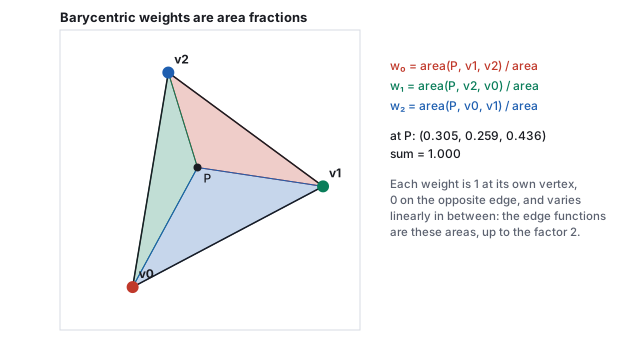
The triangle with the point P inside, split into three sub-triangles colored red, green and blue; each sub-triangle's area over the whole area is the weight of the opposite vertex.
\(w_0\) is the fraction of the area in the sub-triangle opposite \(\mathbf{v}_0\), and so on. Each weight is 1 at its own vertex, 0 on the opposite edge, and linear in between.
Worked example (the pixel’s color) For pixel \((5, 6)\): \(w = (0.1264, 0.1072, 0.1804)/0.414 = (0.305, 0.259, 0.436)\), summing to \(1.000\). With corner colors red \((0.92, 0.25, 0.20)\), green \((0.20, 0.75, 0.35)\) and blue \((0.20, 0.45, 0.95)\): \[ \begin{aligned} \text{color} &= 0.305\,(0.92, 0.25, 0.20) + 0.259\,(0.20, 0.75, 0.35) + 0.436\,(0.20, 0.45, 0.95) \\ &= (0.420, 0.467, 0.566), \end{aligned} \] a grayish blue, nearest the blue corner because \(w_2\) is largest. Any per-vertex attribute is interpolated the same way: colors, normals, texture coordinates, depth. That is Gouraud shading in one line (the meshes chapter compares it with per-pixel shading), and the reason a vertex shader only has to produce values at three corners. The same three weights, applied to a triangle in space, are the hit coordinates of the ray-tracing chapter.
See it live One triangle becomes pixels: the same triangle on a framebuffer of 4 to 64 pixels a side, with the sampled centers and the true edges drawn; rotate it and watch the stair-steps crawl.

5 · Clipping at the near plane

The edge functions assume the triangle has three finite screen positions. A vertex behind the eye has negative \(w'\), and dividing by it flips its projected position to the opposite side of the screen; a vertex at the eye has \(w' = 0\) and no position at all. Triangles that cross the near plane must therefore be cut before the divide, in clip space, where the near plane is the linear condition \(z + w \ge 0\) (NDC \(z \ge -1\) after the divide, as in the viewing chapter).
Sutherland–Hodgman clipping against one plane Walk the polygon’s edges. For each edge from \(\mathbf{a}\) to \(\mathbf{b}\) with signed distances \(d_a, d_b\) to the plane: emit \(\mathbf{a}\) if it is inside; if the edge crosses the plane, emit the crossing point \(\mathbf{a} + t\,(\mathbf{b} - \mathbf{a})\) with \(t = d_a/(d_a - d_b)\), interpolating every attribute with the same \(t\). A triangle clipped by one plane is a triangle, a quadrilateral, or nothing; the other five planes are applied in turn, or left to a guard band.
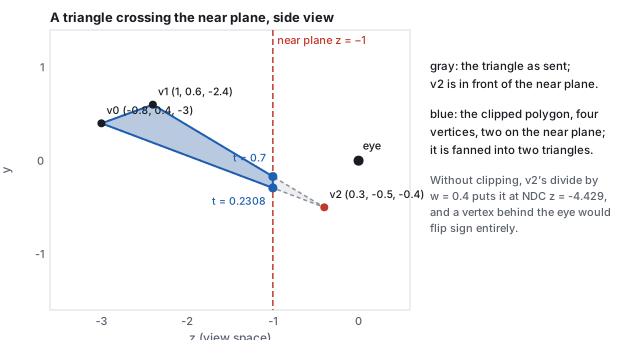
Side view in view space: a gray triangle with two vertices beyond the near plane at z equals minus 1 and one vertex in front of it near the eye; the blue clipped polygon has four vertices, two of them on the near plane, with the interpolation parameters 0.7 and 0.2308 marked.
A triangle with one vertex between the eye and the near plane, clipped in clip space through the projection demo’s \(P\), and drawn back in view space. The result is a quadrilateral, fanned into two triangles.
Worked example (one vertex too close) View-space vertices \(\mathbf{v}_0 = (-0.8, 0.4, -3)\), \(\mathbf{v}_1 = (1, 0.6, -2.4)\), \(\mathbf{v}_2 = (0.3, -0.5, -0.4)\); the third is \(0.4\) in front of the eye, closer than the near plane at \(1\). Through the \(P\) of the viewing chapter their clip coordinates have \(z + w = 4.571,\; 3.200,\; -1.371\): two inside, one outside. Edge \(1\to2\) crosses at \(t = 3.2/(3.2 + 1.371) = 0.700\), edge \(2\to0\) at \(t = 1.371/(1.371 + 4.571) = 0.231\); both crossing points have clip \(z = -w\), NDC \(z = -1\), and lie on the near plane in view space at \((0.51, -0.17, -1)\) and \((0.046, -0.292, -1)\). The output polygon is \(\mathbf{v}_0, \mathbf{v}_1, \mathbf{c}_{12}, \mathbf{c}_{20}\), four vertices, fanned into the triangles \((0, 1, 2)\) and \((0, 2, 3)\). Left unclipped, \(\mathbf{v}_2\)’s divide by \(w = 0.4\) would have put it at NDC \((1.02, -3.02, -4.43)\), far outside the cube and the wrong way up.

Only the near plane truly needs geometric clipping. The side planes can be replaced by a guard band: the rasterizer’s fixed-point coordinates cover a region several times larger than the screen, triangles are allowed to extend into it, and the bounding box clamp of Section 2 simply never visits the off-screen pixels. Triangles larger than the guard band are rare and are clipped geometrically. The far plane needs no clipping either if the depth test is allowed to clamp, and a projection with the far plane at infinity removes it altogether.

6 · Aliasing and supersampling

A pixel is filled or not; nothing in between. So a straight edge that crosses pixels at an angle becomes a staircase, and a moving edge’s staircase crawls. This is the aliasing of the antialiasing chapter: the grid samples the true shape at one point per pixel and cannot represent the edge’s exact position. The coverage the grid reports is wrong in the same way: at \(12\times12\) the triangle covers 19.4 % of the pixels against a true area of 20.7 %, and only at \(256\times256\) does the count converge.
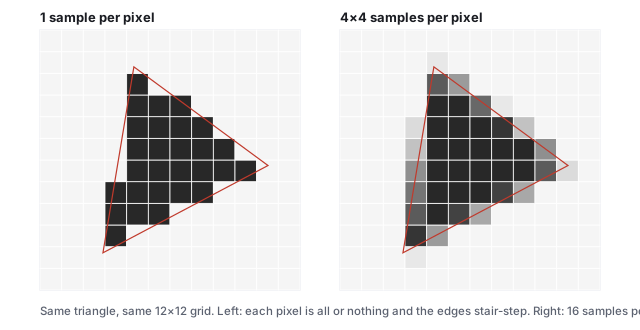
Two renderings of the same triangle on a 12 by 12 grid in gray: with one sample per pixel the edges are hard staircases; with 16 samples per pixel each edge pixel takes a gray level equal to the fraction it covers.
Left: one sample per pixel, all or nothing. Right: \(4\times4\) samples per pixel; each pixel takes the fraction of its samples that fall inside, and the staircase becomes a ramp. Coverage at \(12\times12\) with 16 samples: 20.7 %, the true area.
Definition (supersampling) Test \(k\times k\) sample points per pixel instead of one, shade each, and average. The pixel’s value approximates the fraction of it the triangle covers, blended with whatever is behind. This is filtering before sampling, the cure the sampling theorem prescribes; multisampling (MSAA) is the hardware form that shares one shading result across the samples of a pixel and only resolves coverage per sample. The antialiasing chapter works the coverage levels along one edge and the sample patterns that make them count.

7 · The depth buffer

Nearer surfaces must hide farther ones. Sorting triangles does not work in general (they can interpenetrate or form a cycle), so the decision is made per pixel: beside the color the framebuffer keeps, a second buffer keeps the depth of the nearest thing drawn so far at each pixel.
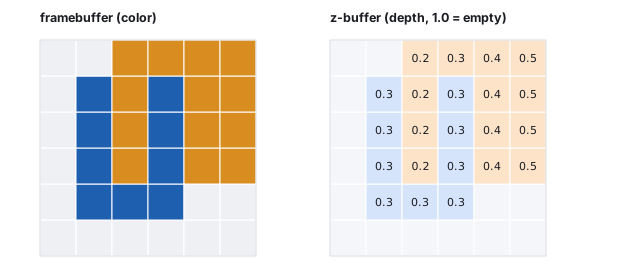
Definition (the z-buffer test) Initialize every depth to “infinitely far” (1 in window depth). For each rasterized fragment, interpolate its depth from the triangle’s corners; if it is less than the stored depth, write its color and its depth, else discard it. Order of drawing does not matter for opaque surfaces; the nearest fragment wins at every pixel. (With the reversed depth of the viewing chapter, the buffer is cleared to 0 and the test is greater.)
Left: a 6 by 6 framebuffer showing a blue triangle A overlapped by an orange triangle B, with B winning in some pixels and A in others. Right: the matching z-buffer with the stored depth printed in each pixel.
Triangle A (blue) drawn first at constant depth 0.3 over \(x = 1..3\), \(y = 1..4\); triangle B (orange) drawn second over \(x = 2..5\), \(y = 2..5\) with depth \(0.2 + 0.1\,(x - 2)\), nearer on its left and farther on its right. The depth buffer shows what decided each pixel.
Worked example (two triangles, one column at a time) Where the two overlap (\(x = 2..3\), \(y = 2..4\)): at \(x = 2\) B’s depth is 0.2, less than the stored 0.3, so B overwrites A in three pixels. At \(x = 3\) B’s depth is 0.3, not less than the stored 0.3, so B is discarded in three pixels and A shows. Beyond \(x = 3\) there is no contest and B writes its depths 0.4 and 0.5. Of B’s 16 fragments, 13 are drawn and 3 rejected. Had B been drawn first, the picture would be identical: the test is symmetric in drawing order, which is the whole point.

Two consequences. Equal depths go to whichever came first, so two coplanar surfaces flicker (“z-fighting”); the fix is to offset one or to keep the near plane far enough out that depth precision is not wasted, as the viewing chapter quantifies. And the test only makes sense for opaque fragments; transparent ones must be blended in back-to-front order after the opaque pass (Section 10), because a discarded fragment cannot contribute a tint.

8 · Early z and overdraw

The depth test sits after the fragment shader in the pipeline diagram, and a fragment that fails it has been shaded for nothing. Hardware therefore runs the test before shading whenever it can (early z), which is whenever the shader does not itself write depth or discard fragments; a coarse version, hierarchical z, keeps the nearest depth of each tile of pixels and rejects whole tiles of a distant triangle in one comparison. What is saved is the shading of hidden fragments, the overdraw.

Worked example (the same two triangles, and a scene) In Section 7, A then B shades \(12 + 16 = 28\) fragments without early z and \(12 + 13 = 25\) with it (B’s 3 rejected fragments are never shaded). B then A shades \(28\) without and \(16 + 6 = 22\) with it: A’s 6 hidden fragments are rejected before shading. The saving depends on the order: drawing front to back rejects the most. At \(1920\times1080\) with an average overdraw of 3, back-to-front order shades \(6{,}220{,}800\) fragments, front-to-back shades \(2{,}073{,}600\), one per pixel, and a random order shades on average \((1 + \tfrac12 + \tfrac13) = 1.83\) per pixel, \(3{,}801{,}600\). Engines sort opaque draws front to back for this reason, and some render a cheap depth-only pass first so that the expensive shading pass has zero overdraw.

9 · Perspective-correct interpolation

Barycentric weights computed on the screen interpolate linearly in screen space. But a triangle’s attributes vary linearly in world space, and perspective is not linear: the divide by depth compresses the far half of a receding edge into a small part of the screen. Interpolating a texture coordinate with screen-space weights therefore pulls the far texture toward the near end, the classic warped floor of early 3D games.
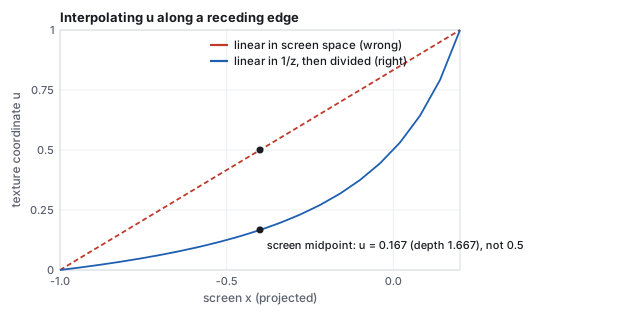
The rule Quantities that are linear on the screen are \(1/w\) and \(a/w\) for any world-linear attribute \(a\). So interpolate \(a/w\) and \(1/w\) with the screen-space weights, then divide: \[ a(\mathbf{p}) = \frac{\sum_i w_i\, a_i / w'_i}{\sum_i w_i\, / w'_i} . \] The GPU does this for every varying attribute; NDC depth \(z/w\) is the one attribute that is already screen-linear, which is why the depth buffer stores it.
A plot of the texture coordinate u against screen x along an edge receding from depth 1 to depth 5: a straight dashed red line for screen-space interpolation and a curved blue line for the perspective-correct result, with the screen midpoint marked at u = 0.167 on the correct curve versus 0.5 on the wrong one.
An edge from \((x, z) = (-1, -1)\) with \(u = 0\) to \((1, -5)\) with \(u = 1\), projected with \(d = 1\): screen \(x\) runs from \(-1\) to \(0.2\). Half of the screen span is far less than half of the edge.
Worked example (the midpoint of the screen span) At the screen midpoint (\(t = \tfrac12\) in screen space, \(x_{\text{screen}} = -0.4\)):
screen-linear\(u = \tfrac12\cdot0 + \tfrac12\cdot1 = 0.5\), wrong
\(1/w\)\(\tfrac12\cdot\tfrac11 + \tfrac12\cdot\tfrac15 = 0.6\), so the depth there is \(1/0.6 = 1.667\)
\(u/w\)\(\tfrac12\cdot\tfrac01 + \tfrac12\cdot\tfrac15 = 0.1\)
correct \(u\)\(0.1/0.6 = 0.167\)
The screen’s midpoint is only a sixth of the way along the edge in the world, at depth 1.667, not 3. The far four-fifths of the edge occupy the last fifth of the screen. The texture chapter is where this coordinate is used.

10 · Blending: the over operator and premultiplied alpha

A fragment that passes the depth test replaces the stored color, unless blending is on, in which case it is combined with it. The combination for a partly transparent surface is Porter and Duff’s over operator (1984), with \(\alpha\) the fragment’s coverage or opacity:
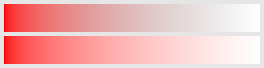
Definition (over, and premultiplied color) \[ C_{\text{out}} = \alpha\,C_{\text{src}} + (1 - \alpha)\,C_{\text{dst}} . \] A color stored premultiplied holds \((\alpha C, \alpha)\) instead of \((C, \alpha)\), and over becomes \(C_{\text{out}} = C'_{\text{src}} + (1 - \alpha)\,C_{\text{dst}}\), which composes associatively: a stack of layers can be flattened in any grouping. Straight (unpremultiplied) color cannot be filtered correctly, because averaging colors of texels with different alphas weights a transparent texel’s meaningless color as much as an opaque one’s.
Worked example (three layers, and a filtered edge) Red at \(\alpha = 0.5\) over blue gives \((0.5, 0, 0.5)\); green at \(0.5\) over that gives \((0.25, 0.5, 0.25)\). Swap the two transparent layers and the result is \((0.5, 0.25, 0.25)\): over is not commutative, which is why transparent surfaces are sorted and drawn back to front. Now filter a texture whose two neighboring texels are opaque red \((1, 0, 0, 1)\) and fully transparent black \((0, 0, 0, 0)\), sampled halfway between. Straight alpha interpolates color to \((0.5, 0, 0)\) and alpha to \(0.5\); composited over white, \(0.5\,(0.5, 0, 0) + 0.5\,(1,1,1) = (0.75, 0.5, 0.5)\), a dark brownish pink, though nothing dark exists in the texture. Premultiplied, the texels are \((1,0,0,1)\) and \((0,0,0,0)\), the midpoint is \((0.5, 0, 0, 0.5)\), and over white gives \((0.5, 0, 0) + 0.5\,(1,1,1) = (1, 0.5, 0.5)\), a pink of half-strength red, as it should be.
Two horizontal strips fading from opaque red on the left to transparent on the right over a white background: the top strip, straight alpha, darkens to a brownish gray in its middle; the bottom strip, premultiplied, fades cleanly from red to white.
The two texels of the worked example interpolated across a strip and composited over white: straight alpha (top) with its dark fringe, premultiplied alpha (bottom) without.

Blending must be done in linear light, not on encoded values, for the reasons the color chapter works through; the hardware blend unit operates on whatever the framebuffer format holds, so an sRGB framebuffer is declared as such and decoded on the way in. Additive blending (\(C_{\text{src}} + C_{\text{dst}}\), for fire and glows) and multiplicative blending (for shadows and tints) are the same unit with other factors, and all of them read the destination, which is why a blended pass cannot use early z to skip anything.

11 · Lines: Bresenham

Before triangles there were lines, on plotters and vector displays, and the algorithm that drew them (Bresenham, 1965) is the first rasterizer: which pixels approximate a segment from \((x_0, y_0)\) to \((x_1, y_1)\), using only integer additions. For a shallow line, step \(x\) by one each time and decide whether \(y\) steps, keeping an integer error term that tracks how far the ideal line has drifted from the current row.
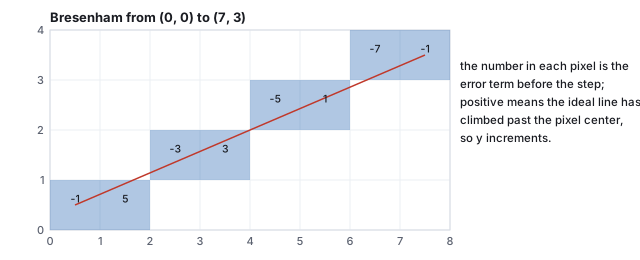
An 8 by 4 pixel grid with the line from (0,0) to (7,3) drawn in red through pixel centers and the eight chosen pixels shaded blue, each labeled with the error term at that step.
Bresenham’s line from \((0, 0)\) to \((7, 3)\). The error term starts at \(2\Delta y - \Delta x = -1\), gains \(2\Delta y = 6\) at each step, and loses \(2\Delta x = 14\) whenever it goes positive and \(y\) increments.
Worked example (eight pixels) \(\Delta x = 7\), \(\Delta y = 3\), error \(e = 2\Delta y - \Delta x = -1\). At each \(x\): plot; if \(e > 0\), increment \(y\) and add \(2(\Delta y - \Delta x) = -8\); else add \(2\Delta y = 6\). The error runs \(-1, 5, -3, 3, -5, 1, -7, -1\) and \(y\) steps after the values \(5, 3, 1\): pixels \((0,0), (1,0), (2,1), (3,1), (4,2), (5,2), (6,3), (7,3)\). Each pixel is the one whose center is nearest the line in its column, and no multiplication or division was needed. The same idea, one error term per edge, is what the incremental edge functions of Section 2 generalize.

A modern GPU draws a line as a thin quad, two triangles of the line’s width, through the ordinary triangle rasterizer; Bresenham survives in software rasterizers, in two-dimensional graphics libraries, and as the reason the term “raster” means a grid walked one step at a time.

12 · The GPU pipeline

By the mid-1980s the steps that turn a scene of triangles into pixels were settled, and they were cast into hardware as a fixed assembly line; since about 2001 two of the stations run user code. A GPU is this sequence built as silicon: hardware shaped like the algorithm.
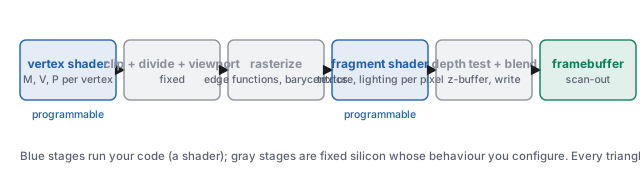
Six boxes left to right: vertex shader (programmable), clip + divide + viewport, rasterize, fragment shader (programmable), depth test + blend, framebuffer.
The stages every triangle passes. Blue stages run a shader you write; gray stages are fixed function whose behaviour you configure (culling, the depth test, blending).
stagewhat it doeschapter
vertex shaderper vertex: \(M\), \(V\), \(P\); outputs clip coordinates and the attributes to interpolateaffine, scene graphs, viewing
clip, divide, viewportcut triangles at the near plane (Section 5), divide by \(w'\), map to pixels; cull back faces by the sign of the twice-areaviewing, this chapter
rasterizesetup, edge functions per pixel, the tie rule, barycentric weights, perspective-correct interpolationthis chapter
fragment shaderper covered sample: texture lookups, lighting, the colortexture mapping, illumination
depth test and blendz-buffer compare (early when possible); blend with what is therethis chapter
framebufferthe color per pixel the monitor scans out, encoded as the color chapter describesthis chapter

Three more programmable stages exist and are optional. Tessellation shaders sit after the vertex shader and subdivide a patch into triangles on the GPU, which is how the Bézier patches and subdivision surfaces of the curves chapter reach the rasterizer at a resolution chosen per frame. A geometry shader can emit or discard whole primitives (rarely used now; its successor, the mesh shader, builds triangle lists from arbitrary data). And compute shaders run outside the pipeline entirely, on the same cores, for anything that is not drawing: culling, particle simulation, the post-processing of tone mapping.

The economics that shaped it: every stage is embarrassingly parallel (vertices do not depend on one another, nor do pixels), so the machine is thousands of small cores running the same program on different data. A vertex shader runs once per vertex; a fragment shader runs once per covered sample, typically millions of times per frame, which is why per-pixel work is the cost that matters.

13 · Deferred and tile-based pipelines

The pipeline above shades a fragment as soon as it is rasterized, which is forward shading. Two rearrangements are common. Deferred shading rasterizes the scene once into a G-buffer, several framebuffers holding each pixel’s position or depth, normal, base color and material parameters, and then lights the G-buffer in a second pass, once per pixel, with no overdraw and with every light applied only to the pixels it reaches. Tile-based rendering, the design of every mobile GPU, splits the screen into tiles of \(16\times16\) or \(32\times32\) pixels, bins the triangles by tile, and rasterizes one tile at a time in on-chip memory, so that the depth test, blending and the resolve of multisampling never touch external memory.

Worked example (what deferred costs and saves) A G-buffer of four 32-bit targets (\(16\) bytes per pixel) at \(1920\times1080\) is \(33.2\) MB, written once per frame and read once. With \(100\) lights and an overdraw of 3, forward shading evaluates \(2{,}073{,}600\times3\times100 = 6.2\times10^8\) light-pixel pairs (if every light touched every fragment); deferred evaluates \(2.1\times10^8\); a tiled light list that assigns an average of 8 lights to each tile brings it to \(1.7\times10^7\). The price is that the G-buffer fixes one lighting model for the whole scene and cannot hold transparent surfaces, which are drawn forward, sorted, afterward.

14 · The frame loop, the framebuffer, and the budget

Interactive graphics is a loop: read the input, update the model, run the whole pipeline, present the result, again. Nothing can be precomputed because the viewer can act at any moment. The result of each lap lives in the framebuffer, one color per pixel, which the monitor reads top to bottom sixty times a second.
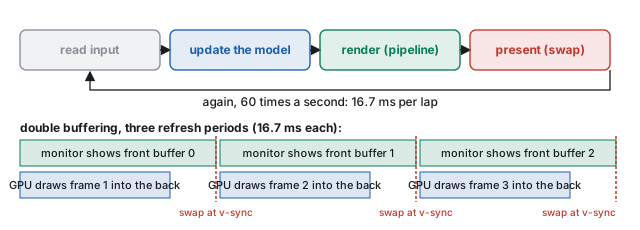
Top: four boxes in a loop, read input, update the model, render the pipeline, present by swapping buffers, with an arrow back to the start labeled 16.7 milliseconds per lap. Bottom: a timeline of three refresh periods showing the monitor scanning out the front buffer while the GPU draws the next frame into the back buffer, with swaps at each vertical sync.
The loop, and double buffering. Drawing into the buffer being displayed lets the monitor catch a half-finished frame (a tear); drawing into a hidden back buffer and swapping at the refresh does not. A frame that misses the swap waits a whole period.
Worked example (the budget) At 60 frames per second a lap is \(1000/60 = 16.67\) ms, for everything: input, simulation, every shader, the swap. A \(1920\times1080\) framebuffer has \(2{,}073{,}600\) pixels; at 60 frames per second that is \(124{,}416{,}000\) pixel updates per second, about 8 ns per pixel if they were done one at a time. They are not: they are done thousands at a time, which is the GPU’s reason to exist. Offline rendering has the other budget, hours per frame; the same triangles, a different economy.

The loop is also the shape of the course’s programs: one model (a handful of numbers), a controller that writes it (sliders, keys, a mouse), and views that are pure functions of it (a 3D scene, a matrix panel). No view owns state; the model drives the matrices, never the reverse. Every demo in this text is built that way, and so is every class-example project; the interaction chapter takes the loop apart, including how many of these laps pass between a click and the pixel that shows it.

15 · Hands-on

Hands-on Run these from the css551/ directory.
  1. The edge functions and weights of pixel \((5, 6)\), Section 1, in six lines.
    node -e "const E=(a,b,p)=>(b[0]-a[0])*(p[1]-a[1])-(b[1]-a[1])*(p[0]-a[0]);
    const v=[[0.242,0.143],[0.877,0.479],[0.361,0.858]], p=[5.5/12, 6.5/12];
    const e=[E(v[1],v[2],p), E(v[2],v[0],p), E(v[0],v[1],p)], A=E(v[0],v[1],v[2]);
    console.log(e.map(x=>+x.toFixed(4)), 'area2', +A.toFixed(4), 'weights', e.map(x=>+(x/A).toFixed(3)));"
    Prints [0.1263, 0.1072, 0.1805] area2 0.414 weights [0.305, 0.259, 0.436] (the last digit of two edge values differs from the text’s because the text rounds the corners to three decimals first). Change p to [1.5/12, 9.5/12] and one value goes negative.
  2. Bresenham’s line of Section 11, as a loop.
    node -e "let e=2*3-7, y=0, out=[]; for (let x=0; x<=7; x++) { out.push(x+','+y); if (e>0) { y++; e+=2*(3-7); } else e+=6; } console.log(out.join(' '))"
    Prints 0,0 1,0 2,1 3,1 4,2 5,2 6,3 7,3.
  3. The near-plane crossing parameter of Section 5 from the clip-space \(z + w\) values.
    node -e "const d1=3.2, d2=-1.3714, d0=4.5714; console.log(+(d1/(d1-d2)).toFixed(3), +(d2/(d2-d0)).toFixed(4))"
    Prints 0.7 0.2308.
  4. In the raster demo, set the resolution to \(12\) and count the filled pixels: 28. Rotate the triangle a few degrees and count again; the count changes by one or two while the true area does not. Set the resolution to \(64\) and the count settles near \(20.7\) % of \(4096\), about \(848\).

16 · Exercises

Exercise 1 (edge functions) For the triangle \((0,0), (4,0), (0,4)\), is the point \((1, 1)\) inside? Is \((3, 2)\)?
Solution Twice the area \(E_{01}(\mathbf{v}_2) = 4\cdot4 - 0 = 16\) (counter-clockwise). For \((1,1)\): \(E_{01} = 4\cdot1 - 0 = 4\), \(E_{12} = (0-4)(1-0) - (4-0)(1-4) = -4 + 12 = 8\), \(E_{20} = (0-0)(1-4) - (0-4)(1-0) = 4\); all positive, inside, with weights \((0.5, 0.25, 0.25)\). For \((3,2)\): \(E_{12} = (-4)(2) - (4)(3 - 4) = -8 + 4 = -4 < 0\): outside (it is past the hypotenuse, since \(3 + 2 > 4\)).
Exercise 2 (barycentric) Using the weights of Exercise 1 for \((1,1)\), verify \(\mathbf{p} = \sum w_i \mathbf{v}_i\), and interpolate a depth of 2 at \(\mathbf{v}_0\), 6 at \(\mathbf{v}_1\), 10 at \(\mathbf{v}_2\).
Solution \(0.5(0,0) + 0.25(4,0) + 0.25(0,4) = (1, 1)\). Depth \(0.5\cdot2 + 0.25\cdot6 + 0.25\cdot10 = 5\).
Exercise 3 (increments) For the triangle of Exercise 1, give the three edge functions’ increments per step in \(x\), and use them to get the values at \((2, 1)\) from those at \((1, 1)\).
Solution \(\partial E_{ab}/\partial x = -(b_y - a_y)\): \(E_{01}\): \(0\); \(E_{12}\): \(-(4 - 0) = -4\); \(E_{20}\): \(-(0 - 4) = 4\). From \((E_{12}, E_{20}, E_{01}) = (8, 4, 4)\) at \((1,1)\): \((4, 8, 4)\) at \((2, 1)\). Check directly: \(E_{12}(2,1) = (0-4)(1-0) - (4-0)(2-4) = -4 + 8 = 4\). The increments sum to zero.
Exercise 4 (the tie rule) A quad is split the other way, along the diagonal from \((4, 0)\) to \((0, 4)\), into counter-clockwise triangles \((0,0),(4,0),(0,4)\) and \((4,0),(4,4),(0,4)\). Which pixel centers lie on the shared edge, and which triangle draws them under the top-left rule?
Solution Centers with \(x + y = 4\): \((0.5, 3.5), (1.5, 2.5), (2.5, 1.5), (3.5, 0.5)\). In the first triangle the shared edge runs \((4,0)\to(0,4)\), upward, not top-left; in the second it runs \((0,4)\to(4,0)\), downward, a left edge. The second triangle draws all four: it covers 10 of the 16 pixels and the first covers 6, the mirror image of Section 3’s count.
Exercise 5 (coverage) The 12-pixel grid reported 19.4 % coverage for a triangle of true area 20.7 %. Explain why the count can be either too low or too high, and why supersampling helps.
Solution Each pixel is counted whole or not at all by where its single center falls; edge pixels that are mostly covered but whose center is outside are lost, and mostly-empty ones whose center is inside are gained. Which dominates depends on where the edges fall, so the error has either sign. Sixteen samples per pixel count fractional coverage, and the error shrinks with the sample count; here it reaches the true 20.7 % at \(12\times12\).
Exercise 6 (clipping) With the vertices of Section 5, move \(\mathbf{v}_2\) to \((0.3, -0.5, +0.4)\), behind the eye. What is its clip-space \(z + w\), what is \(t\) on edge \(1\to2\), and what would the unclipped divide do to it?
Solution For the \(P\) with near 1 and far 8, \(z_{\text{clip}} = -1.286\,z - 2.286\) and \(w = -z\): at \(z = 0.4\), \(z_{\text{clip}} = -2.800\), \(w = -0.4\), \(z + w = -3.2\), outside. \(t = 3.2/(3.2 + 3.2) = 0.5\): the crossing is now halfway along the edge. Unclipped, dividing by \(w = -0.4\) negates every coordinate: the vertex would project to the opposite side of the screen and behind the far plane, and the triangle would fill the wrong region of the image.
Exercise 7 (z-buffer) Redraw Section 7 with B drawn first and A second. Which of A’s fragments are rejected?
Solution After B, the overlap column \(x = 2\) holds 0.2 and column \(x = 3\) holds 0.3. A’s depth 0.3 is not less than 0.2 at \(x = 2\) (rejected, 3 fragments) and not less than 0.3 at \(x = 3\) (rejected, 3 fragments); at \(x = 1\) and at \(y = 1\) there is no contest and A draws. The final picture is the same as before except at \(x = 3\), where the tie now goes to B: equal depths are decided by drawing order, which is the origin of z-fighting.
Exercise 8 (perspective-correct) On the edge of Section 9, at what screen position is the true midpoint of the edge (\(u = 0.5\), world depth 3)?
Solution The edge midpoint in the world is \((x, z) = (0, -3)\), which projects to screen \(x = 0/3 = 0\). Screen \(x\) runs from \(-1\) to \(0.2\), so \(u = 0.5\) sits at \(t = 1/1.2 = 0.833\) of the screen span: five-sixths of the way across, not half.
Exercise 9 (blending, in code) Write a node one-liner that composites three layers, red, green and blue each at \(\alpha = 0.5\), over black in both orders (red first, blue first). Which channel ends up strongest in each?
Solution const over=(s,a,d)=>d.map((c,i)=>a*s[i]+(1-a)*c); let c=[0,0,0]; for (const L of [[1,0,0],[0,1,0],[0,0,1]]) c=over(L,0.5,c); console.log(c) gives \((0.125, 0.25, 0.5)\): the last layer drawn dominates. Reversing the order gives \((0.5, 0.25, 0.125)\). The nearest transparent surface must be drawn last, so back-to-front sorting is not optional.
Exercise 10 (the budget) A fragment shader costs 200 instructions. At \(1920\times1080\), 60 frames per second, and an average overdraw of 3 (each pixel covered by three fragments), how many shader instructions per second is that, and how many with front-to-back order and early z?
Solution \(2{,}073{,}600 \times 3 \times 60 \times 200 = 7.5\times10^{10}\) instructions per second, 75 billion; a modern GPU sustains this comfortably in parallel and a CPU core does not, which is the division of labor the pipeline encodes. Front to back with early z shades one fragment per pixel: \(2.5\times10^{10}\), a third.